Track AI image costs per client
To track AI image costs per client, file every generation to the client it was made for and price it at the moment it is made, not at the end of the month. In Plurum each image or clip made for a client lands on that client's statement with its date, model, size, what was asked for and what it cost. Statements shows it for any month, and you can export it as a PDF under your own business name.
The example: a month for an estate agency
Halden & Finch is a fictional estate agency in Plurum's demo studio. In September we made a house launch for it: four empty rooms photographed as they were left, the same rooms furnished, a family of three built as characters, and the family at home in each room.


What the statement shows. Twenty-six lines for September, one per generation, each with its date, its model, its size, the first words of what was asked for, and its cost. The total for the month was $3.88 (the demo studio's statement, read 28 September 2026). Every line carries a "via assistant" mark, because we made this house through the assistant; a line made by hand carries none.
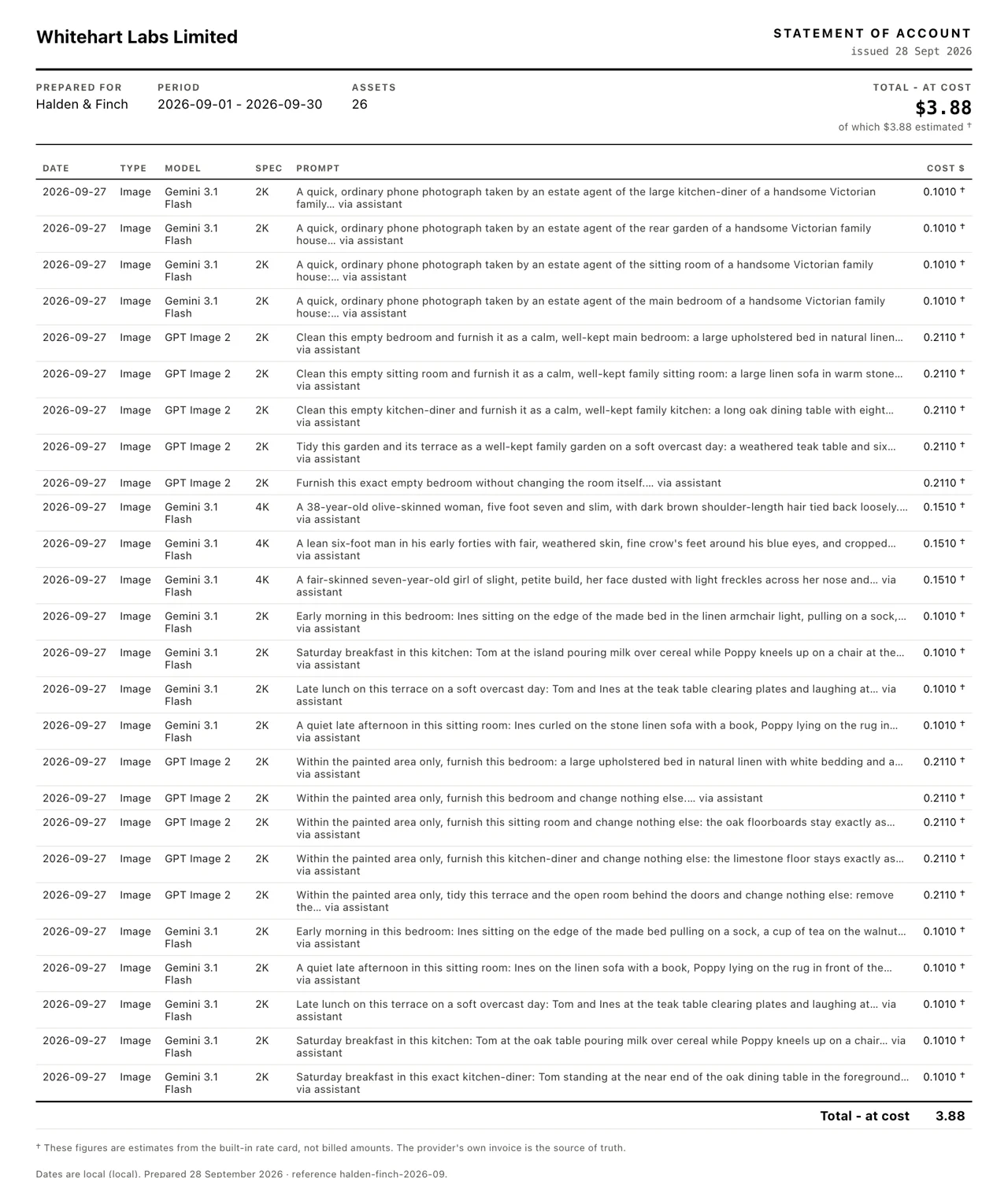
What is on it, and what is not. The pictures we tried and did not use are on it: the statement is what was spent, not what was kept. Four logo drafts we made before the brand existed are not on it, because they were made with no client picked; they sit under Unassigned. And the prompt column shows what we typed, never the brand material Plurum added to it, so the brand's own guidelines stay off a document the client reads.
Why the prices differ. Each line keeps the price it was made at. The starting pictures, the room pictures and the family shots were 2K images on one model at $0.101; the three family character sheets were 4K at $0.151; the furnishing edits ran on another model at $0.211 (rates as of 4 August and 8 September 2026).
We made these through the assistant on the demo; the Generate route in the app does the same thing by hand.
How it works in Plurum
- Pick the client before you generate. On Generate, the Client pill under the prompt decides whose statement a picture lands on.
- Read the price before you spend. The estimate is on the Generate button.
- Set a monthly budget if you want one. In Clients, the entry menu's Monthly budget sets a cap for the whole client in a calendar month: warn and let the run through, or refuse before anything is charged.
- Open Statements. Choose the client and the month, or a custom period.
- Export PDF. It prints on your letterhead, from the business name and details you set in Settings.
What a statement shows
| Column | What it holds |
|---|---|
| Date | The day it was made, in your local time |
| Type | Image or video |
| Model | The model that made it |
| Spec | Its size, such as 2K or 4K |
| Prompt | What you typed, never the brand material added to it |
| Cost $ | The price when it was made, marked † as an estimate |
Below the table: the total for the period, how much of it is estimated, the date of the rates it was priced at, and any generations deleted from the library since, kept on the statement so the total still adds up.
What it does not do
- It estimates; it does not read your provider's bill. Each cost comes from Plurum's rate card for that model and size, and the statement says so with a † on every estimated line. Your provider's own invoice is the source of truth.
- A price is kept, not recalculated. If a rate changes, past lines keep the price they were made at, so a statement you have sent does not change under you.
- Work with no client picked is not on a client's statement. It sits under Unassigned.
- A call the provider refused is not on the client's statement. Plurum records it on Platforms, against the provider, so you can see it, but it does not bill a client for a picture that does not exist.
- Statements is on the paid plans. Business, Studio and Team. Free does not include it.
- It runs on your own provider keys. You pay each provider directly, and Plurum adds nothing to the price.
Related
- Statements and your account: Account, on the home page.
- Your keys, your machine: who you pay, and where your work is kept.
- How Plurum reads a brand: the client each picture is made for.
Questions people ask
How do I bill a client for AI images?
Export their statement for the month as a PDF. It lists every generation made for them with its cost.
Does deleting a picture remove its cost?
No. A deleted picture stays on the statement as a count and a total, so the month still adds up.
Is the cost exact?
It is an estimate at published rates, marked on the statement. Your provider's invoice is the exact figure.
Can I stop a client going over budget?
Yes. Set a monthly budget on the client and choose to refuse before anything is charged.
Does work my AI agent makes show up?
Yes. It lands on the same statement, marked "via assistant".
Who made this
Plurum is coming soon, for Mac.
Register your interest
Plurum is nearly ready. Leave your details and we'll write to you when your plan opens - that's all we'll use them for.