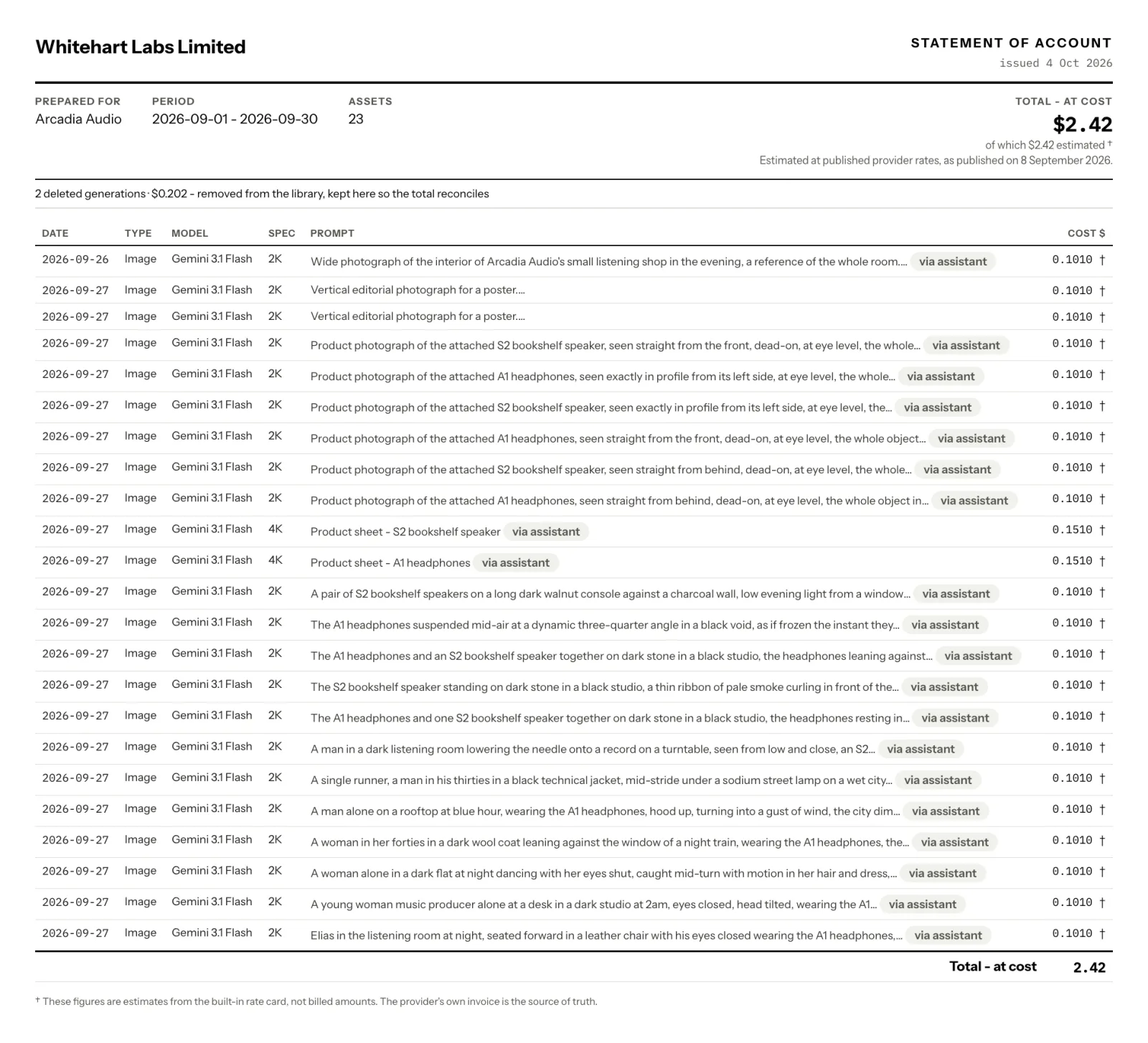
We made most of these through the assistant on the demo; lines made on Generate by hand land on the same statement.
A statement of account for one client and one period: every image and clip made for them, each with its estimated cost, on your letterhead.
Arcadia Audio
Arcadia Audio
Arcadia Audio
The date, what you asked for, the model, the size and the estimated cost.
The prompt column shows what you typed. The brand material Plurum added to it stays off the page.
Each line keeps the estimate it was made at; a later rate change does not rewrite a statement.
Deleted work stays on as one line, so the total still matches what was spent.
Your business and the client, both named, exported as a PDF.
Arcadia Audio is a fictional maker of speakers and headphones in Plurum's demo studio. In September we built its kit and made its first images.

We made most of these through the assistant on the demo; lines made on Generate by hand land on the same statement.

It is in the menu; the spend figure in the sidebar opens it too.
A month, or a custom range. Clients you have since removed are still in the list, so their statements still build.
One line per asset, the total, anything deleted, and the date of the rates behind the estimates.
It prints through your browser, in the light palette, whatever theme you use. The export waits until your business name is set in Settings.
| On the statement | Off the statement |
|---|---|
| Every asset made for the client in the period, archived ones included | Work made with no client picked |
| What you typed | The brand material Plurum added to it |
| Deleted work, as one line with its count and value | The deleted images' prompts |
| An empty cell where an asset could not be priced | A $0.00 for something that was not free |
| A call the provider billed and returned nothing for; that sits on Platforms | |
| Photos you brought in, which cost nothing; their edits are on |
Every figure comes from Plurum's rate card, marked with a †, and the statement says the provider's own invoice is the source of truth.
The statement labels its total "at cost".
If you set a rand rate in Settings, the total shows in rand beside the dollars; it is a conversion of what was spent, not a price.
Each client can have a monthly budget that warns, or refuses before anything is charged.
Business, Studio and Team; the spend figure shows on every plan.
Plurum is coming soon, for Mac.
One line per image or clip made for that client in the period, with its estimated cost, and the estimated total.
They see what you typed. The brand material Plurum added to it is not on the page.
Their count and value stay on as one line, so the total still matches what was spent.
Yes. Set it in Settings, with your details and logo, and the export uses them.
It is an estimate from the rate card, marked as one. Your provider's own invoice is the source of truth.
Plurum is nearly ready. Register your interest and we'll email you when your plan opens.